This article walks you through two key parts of the Hello World teacher experience, navigating your course gradebook and scoring student projects. Watch the videos below and refer to the written summaries for quick reference.
Course Gradebook Overview
The gradebook is where you'll track student progress and access project submissions. Here's what you'll find:
Header: shows your section name, course, and current level
Completed Project Score: average score across all submitted projects per student
Selected Project Score: average score for only the projects you select, useful for progress reports
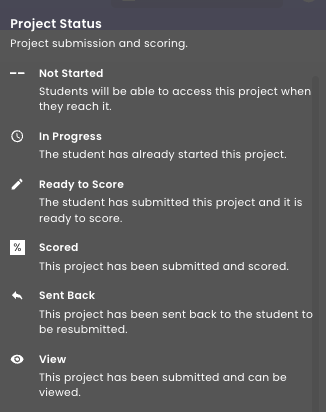
Project Status Icons: Not Started, In Progress, Ready to Score, Scored, Sent Back, View
You can open a project for review as soon as a student has made progress. Scoring is available once a project has been submitted, scored, or sent back.
Scoring Projects
When a project is ready to score, click into it from the gradebook to open the scoring page. From there:
Use the scoring guide and rubric components to evaluate the student's submission
Check or uncheck rubric boxes, the score updates automatically
Add a points adjustment or written feedback if needed
Click Finalize to save the score and make it visible to the student
Click Send Back if the student needs to revise and resubmit